
REBECCA TORVIK

Airspace
Custom Dashboard View Filters
Project Overview
Team
Design: Rebecca, Brandy
PM: Sergio (Lead), Kiyasha (Associate)
Dev: Jacob, Lis, Chad
QA: Kelsey
Duration
6 weeks design (June 2021)
Design Tools Used
Sketch, InVision, Miro
THE PROBLEM
As the operations team continued to grow, their team structure and how operations specialists action and identify the orders within their realm of responsibility were rapidly evolving. The dashboard did not support their fluid workflows.
THE SOLUTION
Enables Operation Leadership to create custom views using conditional logic for Operation Specialists.
The Process
Research
Problem Definition
Sketching & Testing
Solutioning
Validating
Research
Research Plan
We identified the problem, long-term goal, present and ideal state, touchpoints, users involved, HMWs, big questions, and learning goals.

Interviews and Observations
To better understand how Operations is utilizing the dashboard, we spoke with Ops leadership and conducted interviews and observations with Ops specialists.
5
Ops specialist interviews
5
Ops specialist
observations
Multiple
Conversations with Ops leadership
User Groups
It became clear in our research that there are two distinct user groups with 2 distinct goals. Ops leaders want to assign and create role-based views. While Ops Specialists want to action the board based on their assigned roles.
Operation
Leadership
Operation
Specialists
Problem Definition
The Problems
LACK OF FLEXIBILITY
One of the main problems was that not all roles had views. Only 4/12 roles had their own view. Views were hardcoded in the system and difficult to change.

COGNITIVE OVERLOAD
Without sufficient views, Ops specialists were exposed to irrelevant information which lead to cognitive overload. Some roles required you to select multiple views to see applicable orders. Other roles were distinguished by order status. Users often had to hunt through orders searching for ones applicable to their role. Ops Specialists in the Key Accounts role worked on a visually limited dashboard because the fixed header only allowed them to see 6 orders at a time.

MANUAL UPDATES
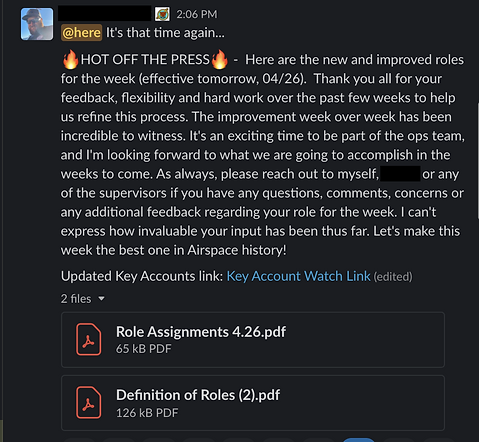
Every week, Ops leadership sent out role definitions and assignments to Ops specialists. They also sent a new dashboard link for anyone in the Key Accounts role with the accounts that they manually updated.
Sketching, Wireframing & Testing
We created sketches and wireframes. Then we tested the view creation tool wireframes with all 5 ops leaders and have kept them updated on the latest iterations.


Refine & Develop Solution
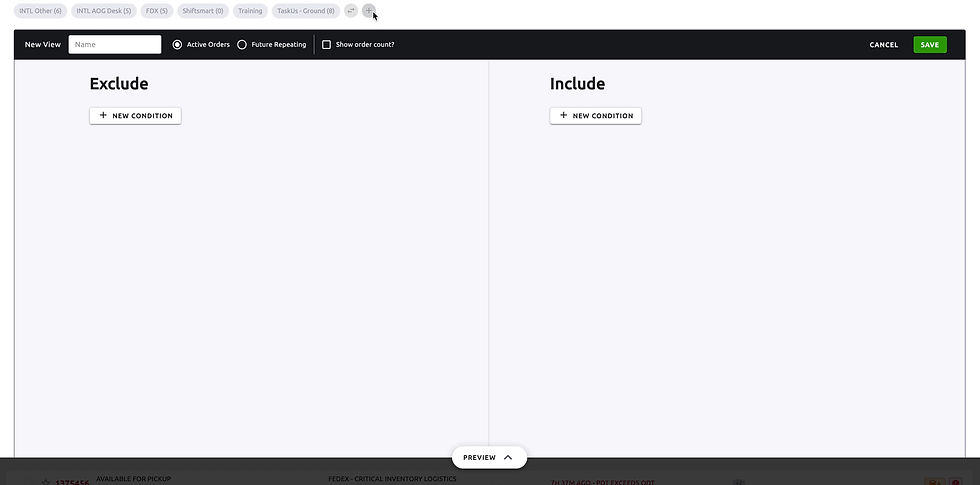
Our solution, provides ops leadership with the building blocks to create their own views and surface those views to Ops specialists using conditional logic.
Access to this creation and editing tool is limited to just Ops leaders. This restriction allows us to support a complex filtering tool behind the scenes for ops leaders but simple and straightforward experience upfront for the Ops specialists.
As an Ops specialists, after you select a role-based view, those orders you see will now be relevant to your role. Choosing what order you should work just got significantly easier.
Value
Flexibility
Ability to make a variety of filter combinations without needing the product team.
Scalability
Future-proofs Operations ever changing needs
Usability
The minimalistic UI and preview functionality allow for easy use.
Impact
Immediate Impact
On-time percentage increased from 45.5% to 90.9% the week of the feature's release.
Long-term Impact
-
Ops leadership has made 10 additional views since it was first released
-
This feature enabled the ability to create the dispatch view, which helped move the dispatch process from slack into the system, and rely more on automation.

Other Work


